

Lenovo Thinkpad Stuck In Update Loop Install FilterDriverU2_Reload

Are you experiencing issues while trying to update your Lenovo Thunderbolt Dock? Fret not, as you’re not alone. There is a known issue with the USB2 filter driver, making it a common roadblock for those looking to apply the most recent updates for their Lenovo Thunkpad docking station. In this guide, we will walk you through the steps to effectively resolve this error and ensure a smooth update for your Lenovo Thunderbolt Dock. Get ready to bid farewell to frustrating issues, and hello to a seamless experience with your Lenovo Thunderbolt Dock.

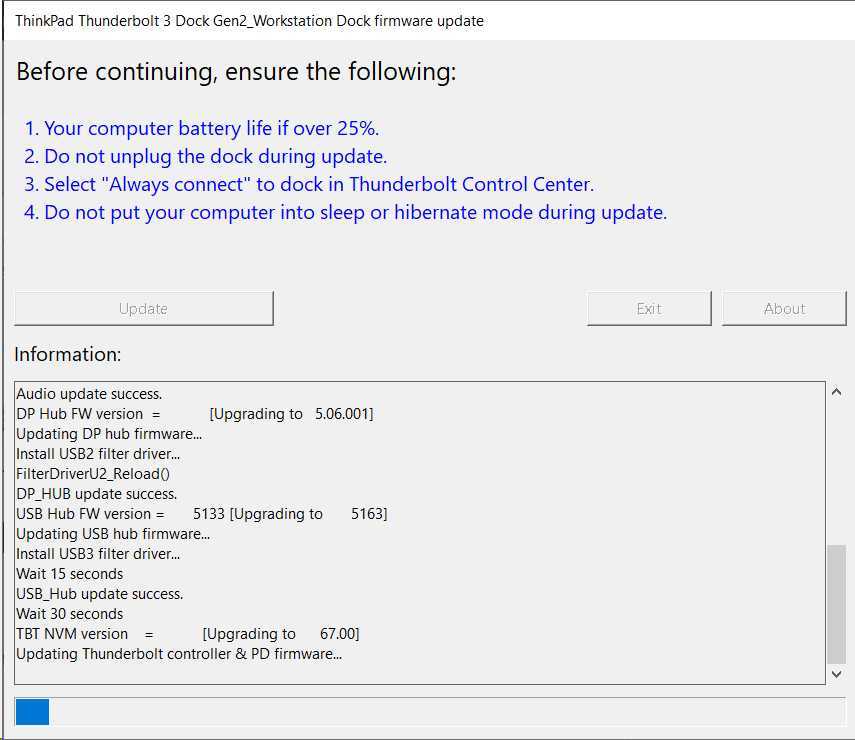
When you trigger the update for the driver, you will see it go through various stages before getting stuck in an update loop with the message below showing several times within the logs for the update progress.

Install USB2 filter driver...
FilterDriverU2_Reload()

The problem is not with the dock itself but with the current status of the dock. In order to resolve the issue, follow the steps below.

  1. Disconnect power to the Lenovo Dock.
  2. Remove all connected devices to the dock, including HTMI, DP and USB cables.
  3. Restore power to the dock.
  4. Connect your laptop to the dock
  5. Trigger the update of the dock again.

The update process will run as it did before and once it reaches the same USB section of the update, where you saw the FilterDriverU2_Reload previously, you should see it complete without any error.
Previous article
Next article

Related Articles

Related Questions

Why Do Clients Hesitate to Work with Overseas Developers?

I've been running a design and development agency based in Pakistan, primarily serving clients in the US, for over two years. Throughout this time,...

What Linux distro is best for an older computer?

I'm looking for suggestions on which Linux distribution I should install on my old computer. Here are the specs: it's running on an Intel...

User-Friendly Alternatives to EC2 for Hosting a Windows Game Server

I'm looking to host a game server in the cloud, and it has to be Windows-based. I can't host it locally because it needs...

LEAVE A REPLY

Please enter your comment!
Please enter your name here

This site uses Akismet to reduce spam. Learn how your comment data is processed.

Latest Tools

Erase Gemini Nano Banana Watermark

Below is a simple content eraser tool. It works very similar to the content aware fill tool that is used in Photoshop. You can...

Keep Your Screen Awake Tool

This simple online stay awake tool prevents your computer screen from going to sleep while you have this page open. It runs entirely in your...

Neural Network Simulation Tool

The Neural Network Visual Builder is an interactive, client-side tool designed to demystify deep learning. It allows users to drag-and-drop neural network layers to...

Ray Trace Simulator – Interactive Optical Ray Tracing Tool

This ray trace simulator lets you visualise how light rays move through an optical system in real time. You can trace beams as they...

Interactive CPU Architecture Simulator

This is an Interactive CPU Architecture Simulator that provides a hands-on, visual learning experience for understanding how a processor executes code. It models a...

AI Image Upscaler

Our AI Image Upscaler allows you to upload any image and instantly increase its resolution using advanced upscaling models. Choose between 2x, 3x or...

Latest Posts

Latest Questions