



CORS stands for Cross-Origin Resource Sharing. For most scenarios, what it does is let you use Javascript to make HTTP requests to a different domain. It is a very important security feature but is a useful thing to enable if you have the need for it. This guide will show you how to enable it for a C# ASP.NET MVC API.
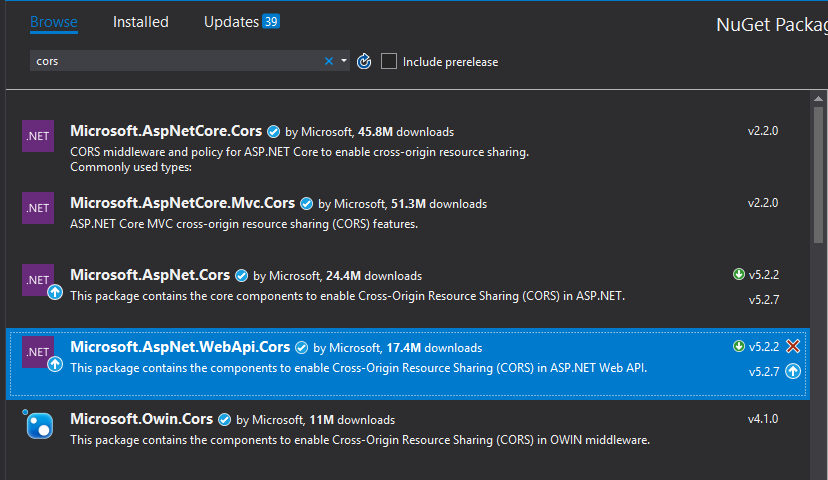
To start, you will need to install a NuGet package called Microsoft.AspNet.WebApi.Cors. The functionality is not included as part of the Web.Http assembly. You will get a reference error if you do not include this package.
Navigate to App_Start/WebApiConfig.cs and modify the Register method to add config.EnableCors();. You can have plenty of other information in this method too. This is the default. All you need is the cors call to have it enabled.
public static void Register(HttpConfiguration config)
{
	config.EnableCors();

	config.Routes.MapHttpRoute(
		name: "DefaultApi",
		routeTemplate: "api/{controller}/{action}/{id}",
		defaults: new { id = RouteParameter.Optional }
	);
}
Once you have added cors to the register method of the project, you need to decorate the cors enabled controllers with an attribute. Make sure to only add this to the controllers you want to enable cors for. This isn’t something you want to have enabled for everything unless you really need to. The following code will enable cors for a specific API controller with ASP.NET.
[EnableCors(origins: "http://domainyouwanttosupport.com", headers: "*", methods: "*")]
public class CorsController : ApiController
{
	//controller actions go in here
}
The code above will allow cross origin requests to a specific domain. If you want to enable it for everything, which you should only do if the controller is safe inside an internal network or something, you can replace the origin string with a *. The snippet below will enable requests for any domain.
[EnableCors(origins: "*", headers: "*", methods: "*")]
The Namespace name ‘Cors’ does not exist error
If you are getting this compiler error when trying to get this to work you more than likely failed to install the nuget package that is required. If you see the error below, install the package highlighted in the image below.
The type or namespace name ‘Cors’ does not exist in the namespace ‘System.Web.Http’ (are you missing an assembly reference?)