



reCaptcha is a smart captcha system that will help prevent spammers from submitting junk data using forms on your website. The system works very well and is relatively simple to implement. This guide will show you how to setup and configure reCaptcha with PHP.
In order to set up reCaptcha, you will need to register for an account. You need to have an account because reCaptcha has an API that it uses to validate the answer given by the user. Most times the user will simply click a box and will be validated as a non-robot. Once you have registered you will have a public and secret key. Take note of these IDs as they are unique to your account.
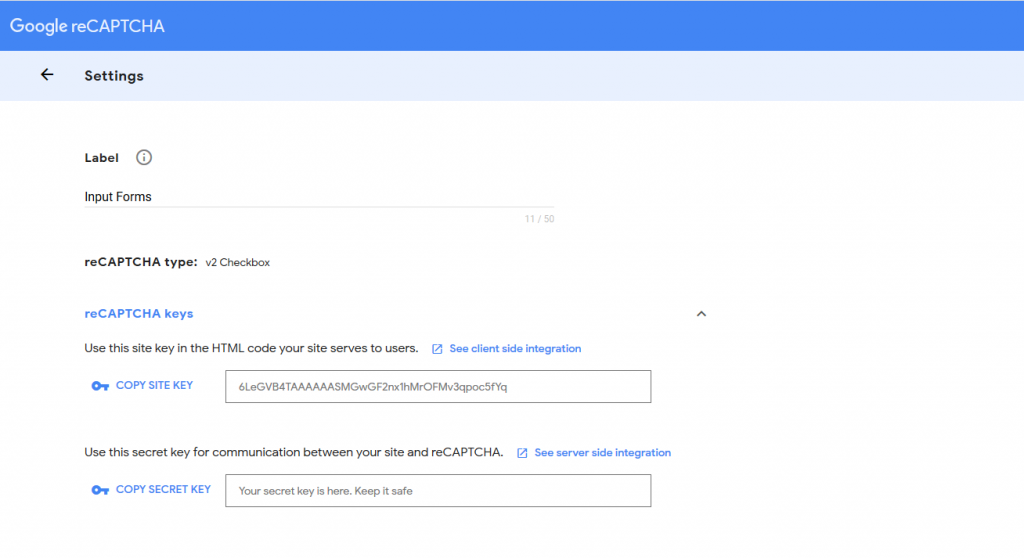
Adding Recaptcha to your HTML
Start by including the following code in the <head> section of your page. This will include the javascript code required to make the reCaptcha work.
<script src='https://www.google.com/recaptcha/api.js'></script>
The next thing you need to do is actually add the widget to your form. Go to the HTML <form> code for this post and add the following div inside the form tags.
<div class="g-recaptcha" data-sitekey="PUBLIC KEY"></div>
If you refresh your page you will now see the reCaptcha tool show up. That’s everything set up from the client-side of things. Next, you need to set up the code that will validate the captcha. This example shows you how to do it using PHP, but it’s simply a REST api. POST the answer to this API and you can get the answer back. This is simple code for any programming language.
Adding the PHP code to handle the response
The following code should be placed on the page that your form submits to. You can do this via AJAX if that’s how you do things. This form must take the variables passed from the form and it will allow you to verify whether the user has spoofed the response or not.
$captchaResponse = $_POST['g-recaptcha-response'];

$appsecret = ENTER-SECRET-HERE;
$url = 'https://www.google.com/recaptcha/api/siteverify';
$data = array('secret' => $appsecret , 'response' => $captchaResponse);

$options = array( 'http' => array(
    'header' => "Content-type: application/x-www-form-urlencoded",
    'method' => 'POST',
    'content' => http_build_query($data), ), );
$context = stream_context_create($options);

$result = file_get_contents($url, false, $context); $result = json_decode($result, true);
if($result["success"] == true)
{
    //VALID!!
}